Safety Compliance in New York City: The Digital Advantage
September 23, 2026 | 21 min read | Safety Best Practices
Adapted from our September 10, 2026 webinar for Associated Builders and Contractors.
Key takeaways
Digitizing paper and digitizing the process are different things. A scanned pre-shift record in Procore is a digital document with a manual process underneath it. The digital advantage starts when the record is created digitally, validated, connected to the worker and the project, and used.
Three pressures now put a clock on New York records. The AVOID Act's 60-day deadline for bringing subcontractors into a claim, in effect since April 2026. DOB enforcement inspections that are more than 30 percent proactive. And 56,992 OATH violations issued in 2025, up 9.6 percent. Different pressures, same need: prove what happened.
Buildings Bulletin 2024-007 lets you keep site safety documents and sidewalk shed and scaffold inspections electronically, on a system that meets the bulletin's conditions. Scans and editable files don't qualify, and the records must be preserved for up to seven years after the job.
What does going digital mean for safety compliance? Less than most contractors think, and more. Scanning a piece of paper and putting it into Procore or Google Drive is technically digital, and it doesn't change the process that produced the paper. Creating documentation and being able to use it are two different things.
For decades the industry has been good at the first: logs, orientations, permits, training records, by the binder. The digital advantage is the second: records that are created once, in the field, validated as they're made, connected to the worker and the company and the project, and retrievable in seconds when an inspector, a claim, or a deposition asks for them.
This article walks the path from one to the other the way we did in the webinar, from the compliance load New York puts on a contractor to the questions you should ask any vendor who says they can carry it.
What You're Actually Responsible for Keeping
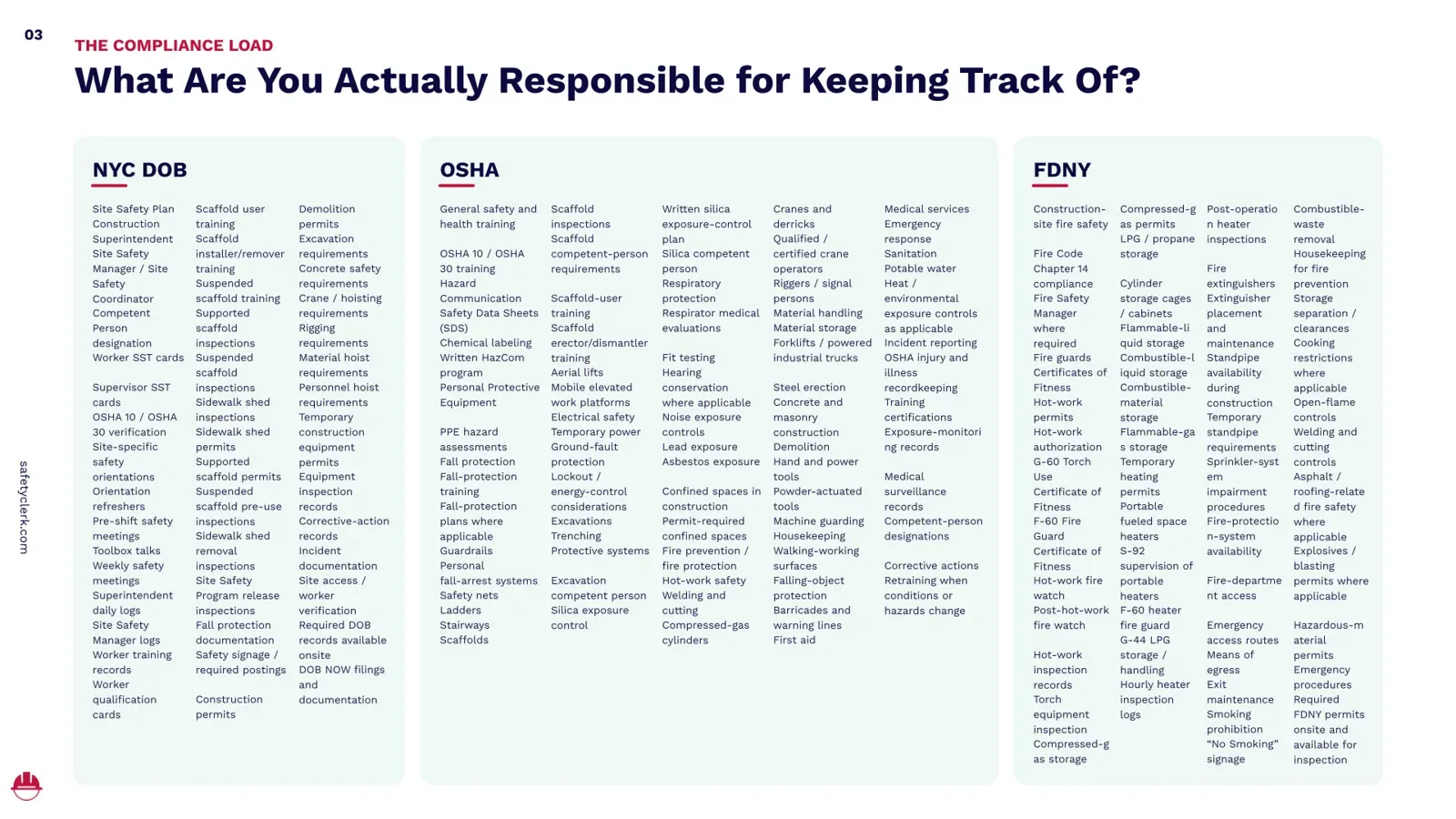
On a New York City jobsite, three agencies write the list. The DOB wants the site safety plan, the superintendent and site safety manager logs, worker and supervisor SST cards, orientations and refreshers, pre-shift and weekly safety meetings, scaffold and sidewalk shed inspections and permits, crane and hoisting requirements, equipment inspection records, corrective actions, incident documentation, and the DOB NOW filings behind all of it.
OSHA wants the training records, the hazard communication program and safety data sheets, PPE assessments, fall protection, scaffold and ladder rules, silica, respiratory protection, confined space, hot work, cranes and derricks, injury and illness recordkeeping, and competent-person designations.
FDNY wants Fire Code Chapter 14 compliance, hot-work permits and fire watch, certificates of fitness, compressed-gas and flammable storage, temporary heating permits and hourly heater logs, extinguisher placement, standpipe availability, and every FDNY permit on site and available for inspection.
We put the whole list on one slide on purpose, and Stefano didn't read it aloud because we'd still be there. What he said instead is the idea the rest of this article rests on: "When I look at this slide, I don't see a lot of documents you need to create. I see hundreds of pieces of information. I see data." Every item on the list is something a contractor must create, verify, update, and, on the day it matters, retrieve. Treated as paperwork, it's a burden. Treated as data and connected, it's the raw material of a better-run company.
Three Pressures With a Clock on Them
Three things are happening at once in New York, and each one shortens the time you have to find a record.
The AVOID Act put 60 days on the claim. The Avoiding Vexatious Overuse of Impleading to Delay Act, signed December 19, 2025 and in effect since April 2026, rewrites CPLR 1007. A defendant now has 60 days after serving its answer to bring a third party into the case on a contract-based claim such as indemnification or failure to procure insurance, and 60 days from becoming aware of the party's potential liability on other claims, with 45, 30, and 20 days for each layer below, extensions capped at 30 days, and no third-party complaints after the note of issue.
For a general contractor on a Labor Law claim, that means the moment the complaint lands you have about two months to know which subcontractor's worker was on site, under what contract, with what insurance, and to bring that subcontractor in or lose the right to shift the liability. Records that used to have a year of discovery to surface now have weeks.
Stefano's version: "Imagine a claim that comes in from a project that ended two years ago. The superintendent doesn't work for you anymore. The subcontractor is gone. The project is closed out. The binders are hopefully somewhere in a storage facility. Suddenly the documentation isn't an administrative issue anymore. It's a legal and financial exposure."
DOB inspections are proactive now. More than 30 percent of the Department's enforcement inspections in 2025 were initiated before a complaint or an incident, and the Department's stated goal is to push that past 60 percent. The inspector who arrives unannounced is no longer the exception.
Violations are up. The DOB issued 56,992 OATH violations in 2025, a 9.6 percent increase on the year before. Stefano's rough math from the podium: roughly $150 million in penalties across the city, an average near $20,000 per jobsite. And fraudulent claims, the fourth pressure, don't come with a statistic, only with the same question as the other three.
A DOB inspection is different from a lawsuit. A lawsuit is different from a questionable claim. They all ask the same thing: can you prove what actually happened?
Documentation Is Evidence
The most important question isn't whether you have the documentation. It's whether you have it when it's required, and whether you can prove it's authentic.
Take a DOB inspection. An inspector asks for a worker's training record. Can the super produce it immediately, or does he turn pages in a binder while the inspector waits? Take a claim two years after close-out. Can you prove the worker was on site that day, who he worked for, and what work was taking place? Then take the third question, the one that started this company.
"Before SafetyClerk, I was working for a contractor, and I was beaten up in a deposition over the authenticity of signatures on our safety documentation," Stefano said. "We had the paperwork. We had the signatures. But the question was, how do you know the worker actually signed it? Can you prove someone else didn't sign on his behalf? My answer was, 'This is how we normally did it on the jobsite.' Not a strong answer." That deposition is one of the reasons SafetyClerk exists. Documentation isn't just compliance. In a claim, it becomes evidence.
The Hidden Cost of Manual Compliance
James talks to New York City contractors every day, and the objection he hears most is reasonable on its face: we already pay people to be compliant. Supers, PMs, safety managers, admin staff. True. The question he asks back is how much of that payroll buys safety and compliance, and how much buys the admin burden attached to it: collecting the paperwork, scanning it, uploading it, filing it, chasing people, searching for something that needed to happen six months ago, and holding internal meetings to stay on top of it all.
"You're paying very talented construction people to do work that technology can do for them," James said. "I'm not talking about removing people. I'm talking about reallocating expensive people's time to the work you actually hired them to do." Give a superintendent five hours back and he's walking the site, finding hazards, talking to the trades, checking that the program is being followed. Give a PM those hours and she's reviewing two-week look-aheads, solving schedule constraints, catching cost exposure, and sitting with the owner.
The cost shows up in four places: administration (collecting, scanning, uploading, filing, searching), field productivity (duplicate work, manual follow-up, time away from the field), project risk (missing records, expired credentials, onboarding delays), and financial risk (violations, stop work orders, claims, schedule impact). "Regardless of the size of your portfolio, the number is never zero," James said. "You're already paying for this. It just doesn't appear in the P&L as one neat line item that says manual compliance. It's spread across salaries, overtime, project delays, legal costs, admin hours, and lost productivity."
Expiration dates make it worse. DOB permits can now expire when the insurance behind them expires. SST cards expire. Scaffold and shed inspections, hot-work authorizations, and equipment inspections all carry dates, and they're managed in spreadsheets, emails, WhatsApp threads, and binders by different people across the organization. Nobody is doing their job badly.
We're asking people to remember hundreds of moving pieces, and we're not robots. Under Local Law 196 the penalty runs about $5,000 per untrained worker found on site and $2,500 for a permit holder who hasn't maintained the training log, and an expired permit can bring a partial stop work order. "The cost isn't the expired document," James said. "The cost is finding out it's expired when the inspector is already standing on the jobsite." That's the fundamental problem with paper: it's reactive. Digital moves the same information to the right person 30 days out, then 14, then 7, so you're preventing non-compliance instead of reacting to it.
Free download
The Digital Advantage: Webinar Recording
Free webinar recording
Watch the Digital Advantage Webinar.
Discover how NYC contractors can move beyond digital paperwork to simplify safety compliance, connect jobsite information, and gain better visibility into their operations. Watch the full webinar recording.
"We're Already Digital"
This is the other conversation James has every week. A contractor says they're digital because their files are in Procore or Autodesk. He asks how the files got there. Are workers doing orientations inside Procore? No. Pre-shifts? No. Toolbox talks, scaffold logs, permits? No. The paperwork is completed on paper, collected, scanned or photographed, uploaded, and organized, and the super spends a couple of hours a day on it, or the company pays someone extra to do the uploading.
"That's not digital," James said. "It's digital with extra steps. It's manual with extra steps." The document is digital. The process is still manual, and you're paying for every step of it.
Digitizing Paper Is Not Digitizing the Process
Two flows look similar on a whiteboard and behave nothing alike on a jobsite.
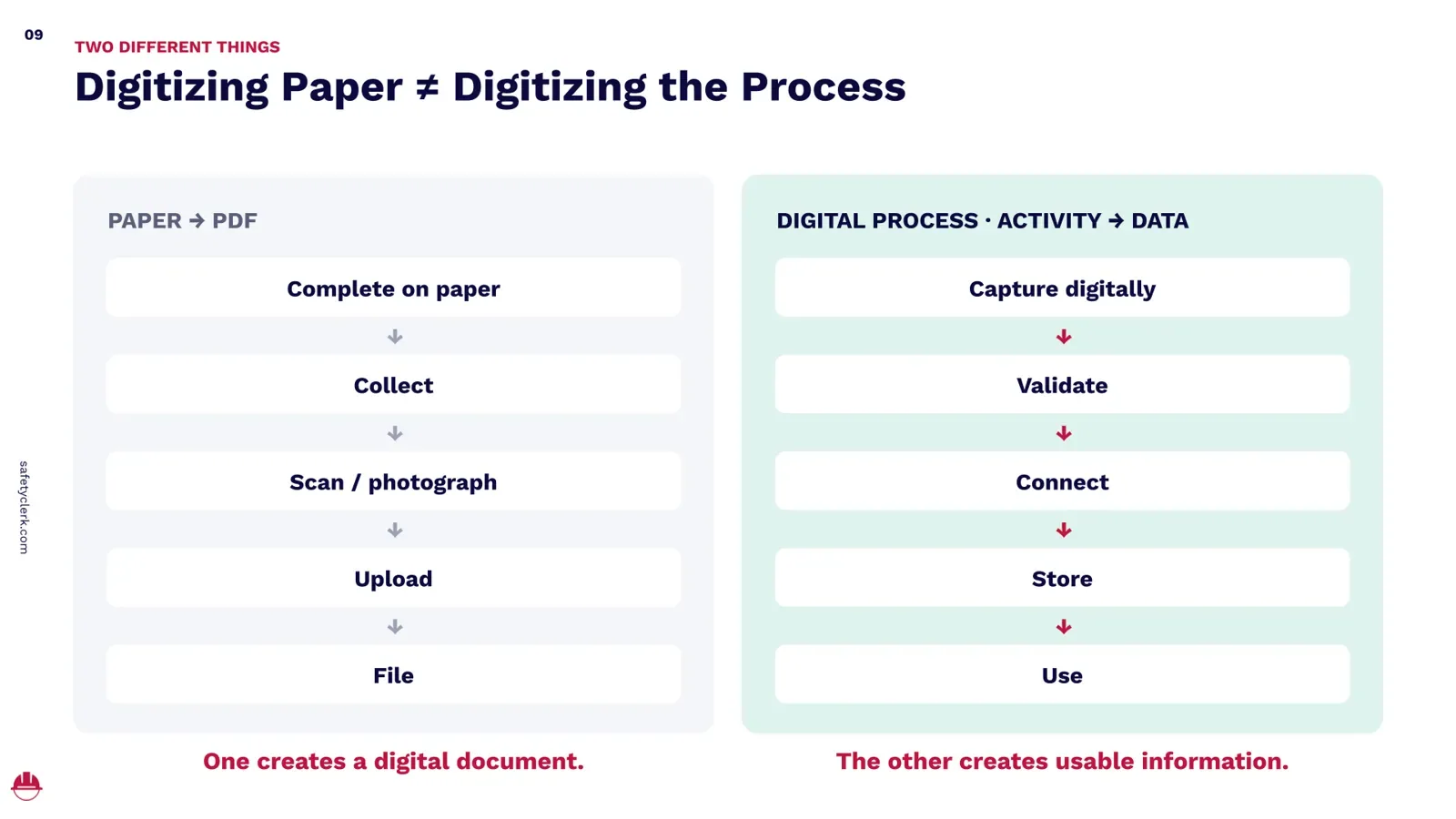
The first: complete on paper, collect, scan or photograph, upload, file. Every arrow is a person's time, and the output is a digital document.
The second: capture digitally, validate, connect, store, use. The record is created on a phone or tablet where the work happens. The system checks that what's being entered is complete and matches the requirement. The record attaches to the worker, the company, and the project, and it flows into the workflows the field and the office share. It's stored, for up to seven years after the job under the bulletin below, and because every record is a data point, it can be used: trended, benchmarked, compared across projects, turned into alerts.
"I don't want a piece of paper on my jobsite other than the permit," James said. "I don't want binders touching my office. I don't want to pay for storage. I want it digital from day one, and I don't want duplicate work." One creates a digital document. The other creates usable information.
What Buildings Bulletin 2024-007 Actually Allows
On December 19, 2024, the DOB issued Buildings Bulletin 2024-007, and a surprising number of contractors still haven't heard of it. It clarifies that the site safety documents Chapter 33 requires you to keep at the jobsite can now be maintained and presented electronically. SafetyClerk ran more than 45 jobsites through the pilot program that preceded it, and the story of how the bulletin came to be is on this blog.
What the bulletin covers: the site safety log, the construction superintendent log, safety orientation and refresher records, pre-shift safety meeting records, the weekly safety meeting, and the SST log, plus sidewalk shed installation, periodic, and daily inspection reports and scaffold installation and pre-shift inspection reports. You can choose which of these to keep electronically. Anything you don't keep electronically stays on paper at the site.
What it requires. A dedicated tablet with at least a 10-inch screen, powered and connected, available to the Department at all times. Records that can be emailed to the Department as a PDF or printed on site. And an electronic document system, which the bulletin defines by exclusion first: scans of paper documents and editable Word or Excel files don't comply.
The system must keep records tamper-proof, validate signatures, and show when each record was created, with eight named safeguards: compliance with New York's Electronic Signatures and Records Act, finalization so a record can't be edited after creation and carries a time stamp and a digital fingerprint of who signed it and when, forgery prevention, retention for up to seven years after the job, clear intent and consent to sign electronically, signature integrity so any change after signing is detectable, user authentication, and a signature tied to the specific document it authenticates.
What it doesn't cover: construction documents, shop drawings, temporary construction equipment records other than shed and scaffold inspections, special inspection records, and the rest of the DOB paper trail, which stays paper. It doesn't change what FDNY, OSHA, DOT, or any other agency requires.
So the bulletin opens the door to a digital jobsite for the records that inspectors ask for most, and it sets a bar that a vendor's software either meets or doesn't. "Ask them about the bulletin," James said. "Ask them when it was released. Ask them about the spec the DOB expects. Walk me through how a DOB inspector will use the software when they come onto the site."
The Maturity Curve: Four Ways to Manage Compliance
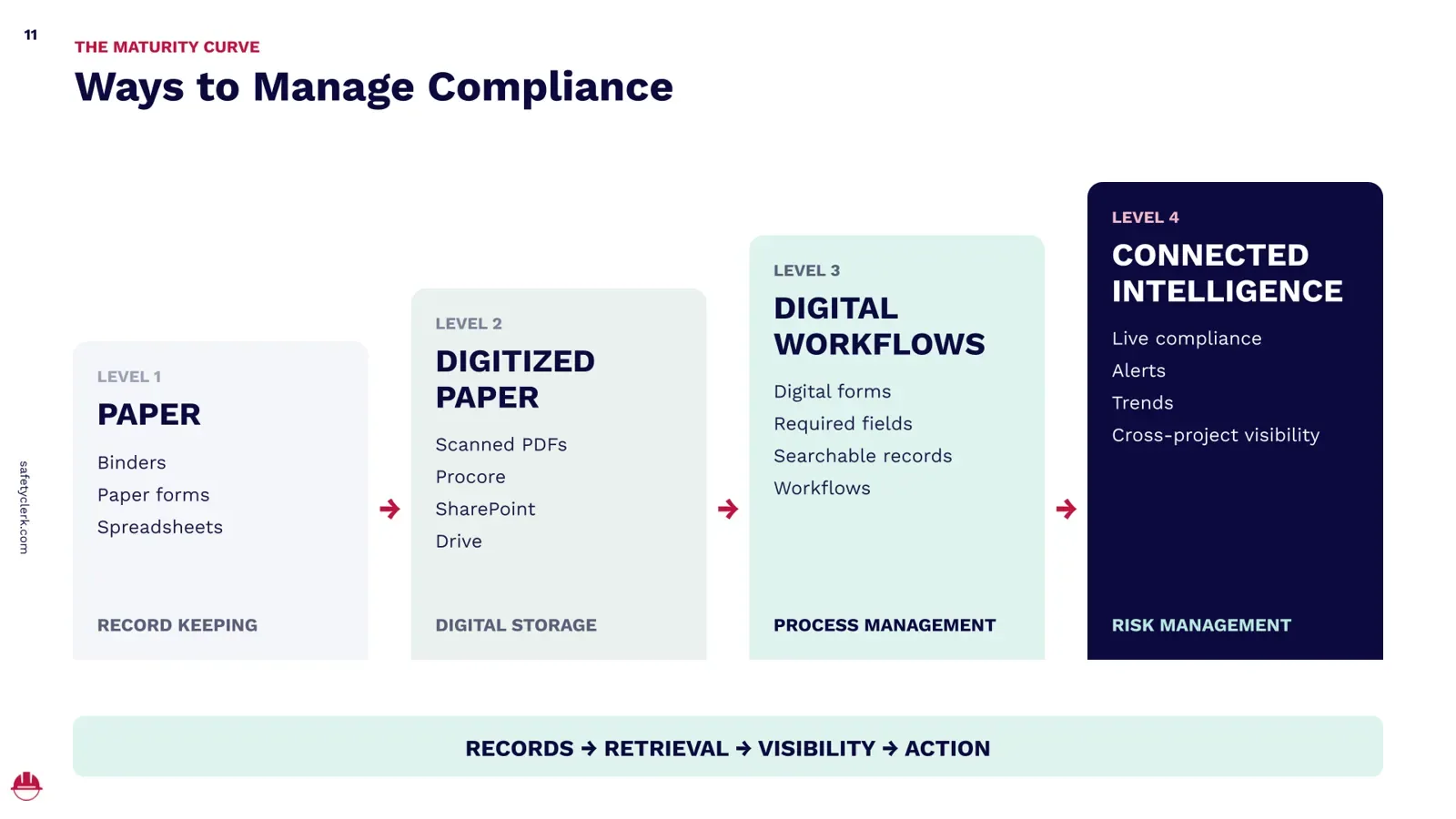
Every contractor we've met sits on one of four levels.
Level 1, paper. Binders, paper forms, spreadsheets. Record keeping.
Level 2, digitized paper. Scanned PDFs in Procore, SharePoint, or Drive. Digital storage.
Level 3, digital workflows. Digital forms with required fields, searchable records, workflows. Process management.
"Most contractors in New York City are at level two," James said. "We're not living in the Stone Age. We have Autodesk, we have Procore." Some are at level three. "Level three and level four is where you need to operate in 2026 and beyond." Level four is what he describes as a digital safety and compliance officer watching every project at once instead of driving between them: showing compliance day by day, flagging permit and scaffold expirations, trending near misses against a benchmark the company sets, and creating KPIs from the data the field already produces.
What you gain at each level:
Capability
Paper
Digitized paper
Digital workflow
Connected intelligence
Manual or double work
High
High
Low
Minimal
Record retrieval
Hours to days
Minutes to hours
Minutes
Seconds
Signature audit trail
Limited
Limited
Yes
Yes
Buildings Bulletin 2024-007
Not applicable
Depends
Depends
Depends on the system
Live compliance
No
No
Partial
Yes
Non-compliance alerts
No
No
Possible
Yes
Subcontractor visibility
No
No
Partial
Yes
Cross-project visibility
No
No
Partial
Yes
Risk trends
No
No
Limited
Yes
Compliance-based access
No
No
Possible
Yes
Digital maturity isn't measured by how little paper you have. It's measured by what you can do with the information.
A PDF Is Not the Same as Data
Two kinds of vendor call themselves digital, and the difference decides whether level four is available to you.
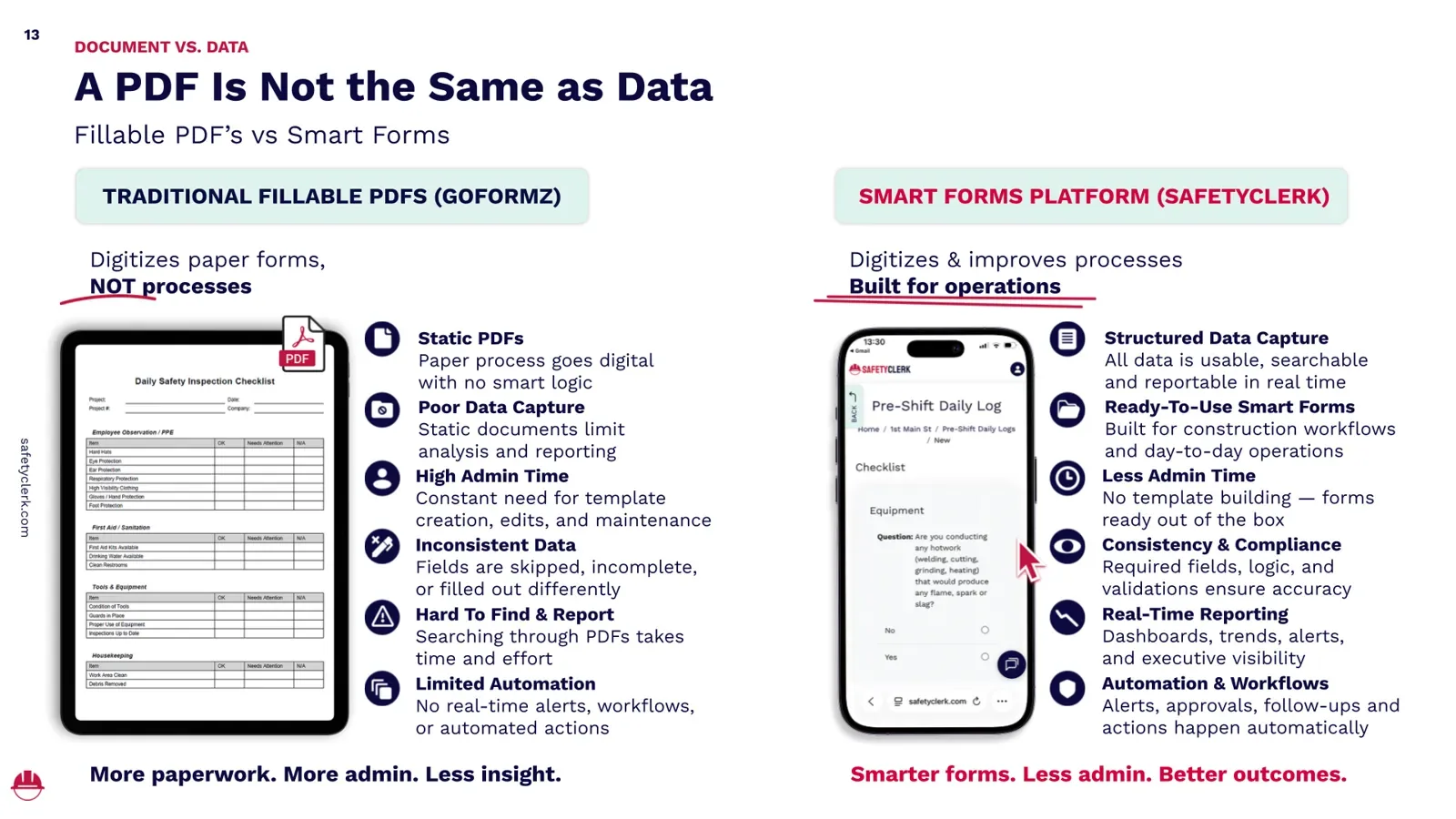
The first offers fillable PDFs. Safety directors built their forms over years and have an attachment to how they look, so a vendor who says "I'll keep your form and make it a PDF" is easy to say yes to. The worker types instead of writes. That's the whole change. The document is static, the data capture is poor, the admin time to build and maintain templates is high, fields get skipped or filled differently, searching means opening files one at a time, and there's no automation behind any of it.
The second offers smart forms: structured data capture, ready-to-use forms built for construction workflows, required fields and validation, real-time reporting, and automation for alerts, approvals, and follow-ups. The difference shows up the moment you want the data to work for you.
"One foreman writes 'ten guys on floor four, two ladders, formwork,'" James said. "The next day a different foreman on the same crew writes 'formwork, floor four.' Two very different inputs. There's no benchmark, no trend, nothing your tools can use." Smart forms fix that by design: instead of typing, the worker selects the floor, the task, the equipment from libraries. That selection is the benchmark, and it's the dataset any analytics or AI tool needs before it can tell you anything true.
Free download
The Digital Advantage: Webinar Recording
Free webinar recording
Watch the Digital Advantage Webinar.
Discover how NYC contractors can move beyond digital paperwork to simplify safety compliance, connect jobsite information, and gain better visibility into their operations. Watch the full webinar recording.
Digital in Practice
Three things that happen on every jobsite, before and after.
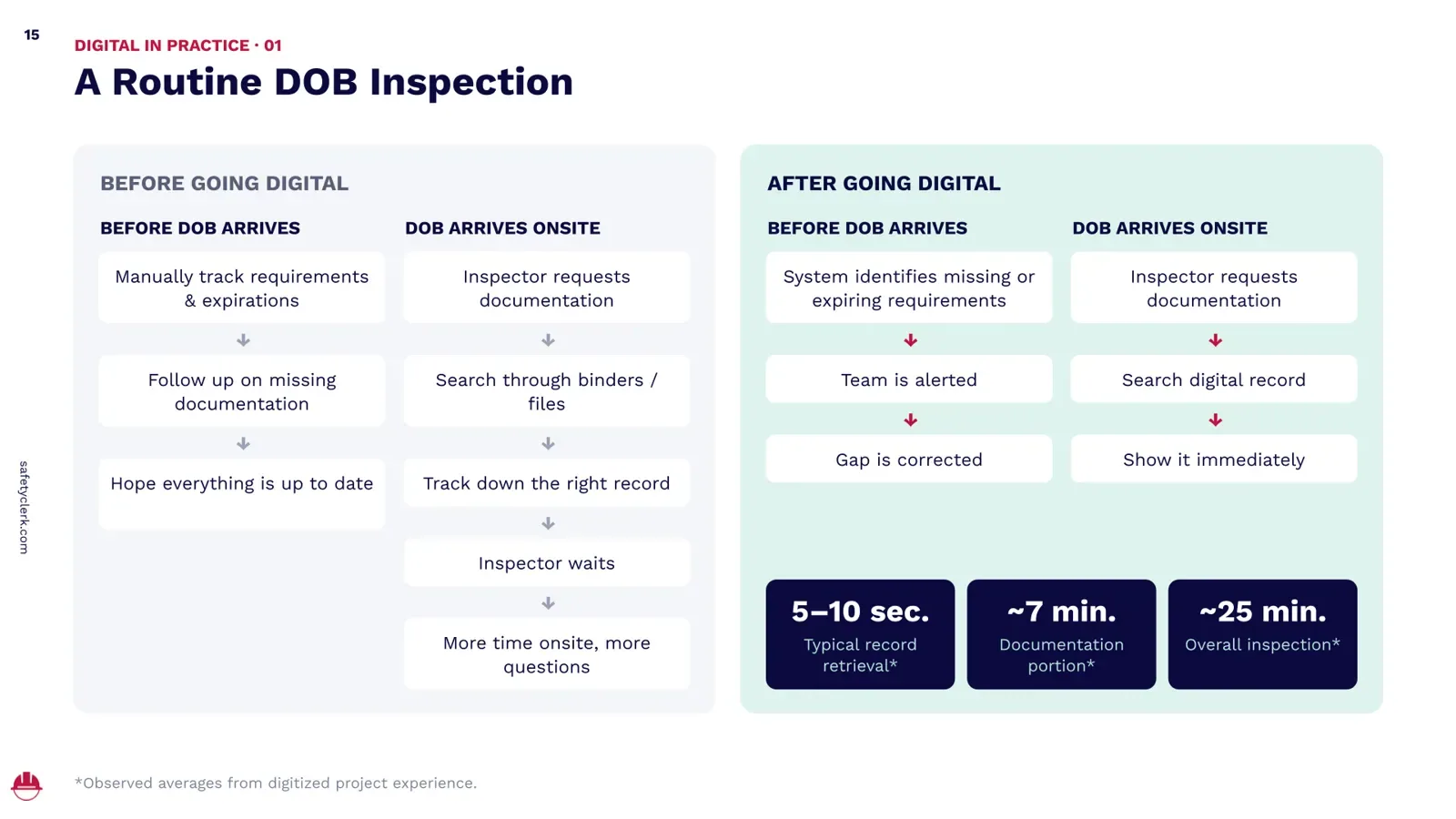
A routine DOB inspection. Before: track requirements and expirations by hand, follow up on what's missing, hope everything is current. The inspector arrives and asks for documentation. The super searches binders, tracks down the record, and the inspector waits, and while the inspector waits he walks. "The longer you have an inspector on your jobsite, the higher the risk of a violation," James said.
After: the system flags what's missing or expiring before the inspector arrives, the team is alerted, the gap is closed. The inspector asks, the super searches the record, and shows it. On digitized projects we've observed record retrieval of 5 to 10 seconds, a documentation portion of about 7 minutes, and an overall inspection near 25 minutes. "Be best friends with your DOB inspectors," James said. "Let them look forward to your jobsites, so they can get off them as soon as possible."
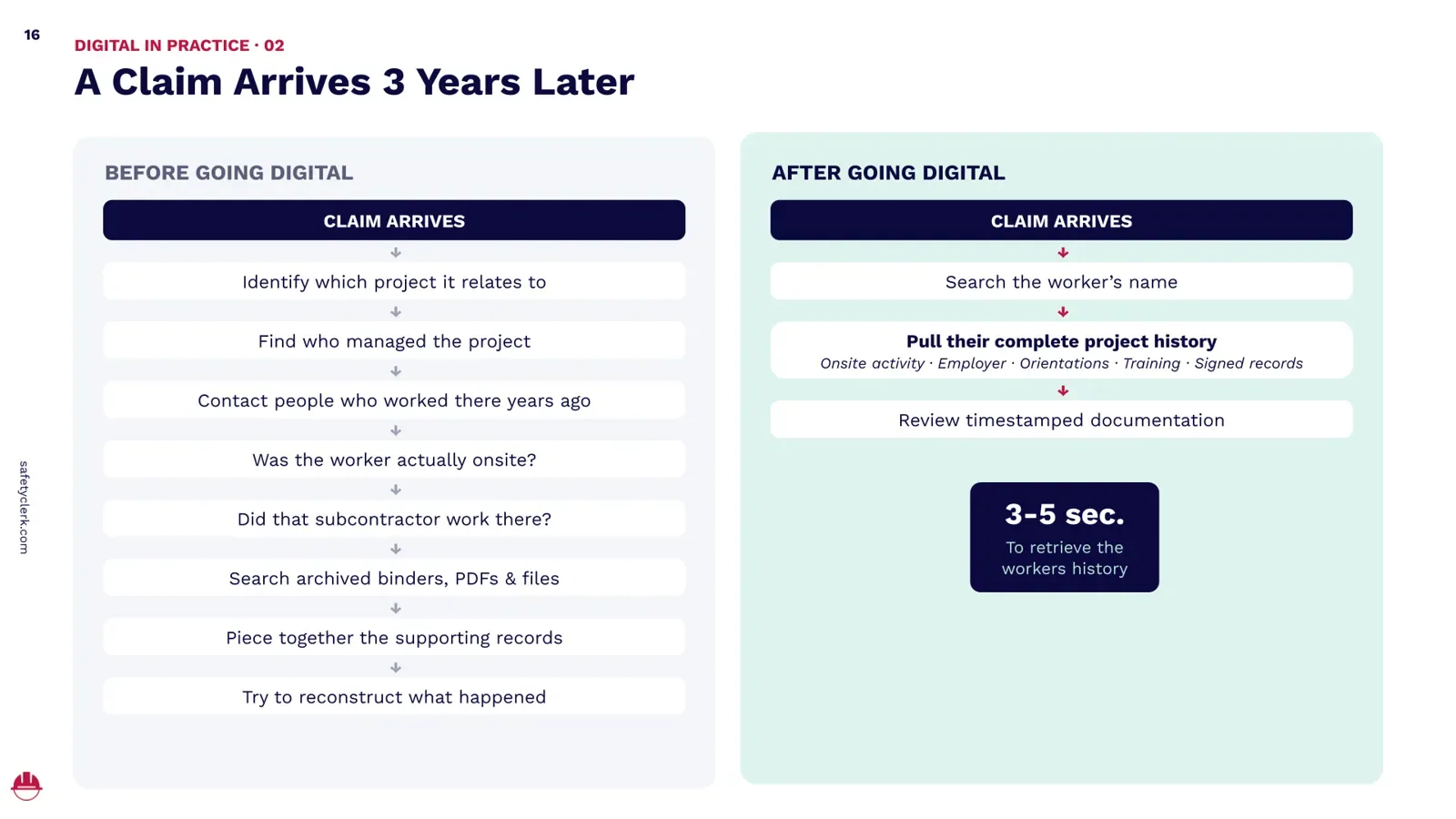
A claim arrives three years later. Before: figure out which project, find who managed it, call people who worked there years ago and may not work for you now, establish whether the worker was on site and whether that subcontractor was there, search archived binders and files, and reconstruct what happened, on the AVOID Act's clock.
After: search the worker's name and pull the complete project history, on-site activity, employer, orientations, training, signed records, with time stamps and signatures that meet the bulletin's standard. Three to five seconds to retrieve the worker's history.
You can't be on every jobsite. A safety director with five projects or fifty learns what happened through phone calls, emails, PDF reports, spreadsheets, and weekly meetings, after it happened. Connected oversight shows live activity, compliance status, missing requirements, exceptions, trends, and project comparisons while it's happening. "Projects A, B, and C are fine. D, E, and F are a warning. G, H, and I need my priority right now," James said. "Every dollar I'm paid as a safety director goes where the priority is."
From Documentation to Intelligence
The progression has four steps, and most companies stop at the second.
Document: what happened?
Compliance: are we meeting requirements?
Visibility: where are the gaps?
Intelligence: where should we intervene?
The last step is where the data on that first slide pays for itself. Project A shows repeated missing documentation. Subcontractor B's compliance is declining across three projects. Crew C's safety observations are climbing. Project D has a wave of credentials approaching expiration. Project E's compliance activity looks unusual.
None of those is an incident yet. All of them are places to send a safety manager this week instead of an investigator next month, and the same signals matter to the risk team weighing workers' comp and GL exposure. Stop asking only what went wrong. Start asking where to intervene.
Don't Start With Software
You buy from vendors constantly, so this part isn't new, and it gets skipped anyway. "Never start with the software," James said. "Don't just look at brands and start talking to salespeople. Start with your problems." Six questions do it:
Where are we doing work twice?
What takes too long to retrieve?
Where does information get lost?
What do we discover too late?
What can't leadership see today?
What data could help us manage risk?
Write the answers down. They're the boxes a vendor has to check. Define the outcome first, and evaluate the technology second.
Twelve Questions to Ask Any Safety Technology Vendor
"Salespeople are trained to say yes until you buy," James said. "Test them. Make sure they know what they're talking about, because you're going to lean on them for implementation and support afterward." Twelve questions, and the New York ones come first.
Does it meet NYC DOB Buildings Bulletin 2024-007 requirements?
Which DOB-required records can be maintained electronically?
How are signatures, timestamps, and audit trails maintained, is the process ESRA compliant?
Can records be produced immediately during an inspection?
What happens without internet connectivity?
Does it eliminate work, or move paperwork onto a screen?
Can it alert us before something becomes non-compliant?
Does information need to be entered more than once?
Can it connect worker, company, and project compliance?
Can leadership see compliance across projects?
Can historical records be reconstructed years later?
How are DOB and OSHA regulatory changes incorporated?
Don't ask only whether it can replace your binders. Ask how it could truly mitigate your risk.
Frequently Asked Questions
What is NYC DOB Buildings Bulletin 2024-007?
An operational bulletin issued December 19, 2024 that clarifies how site safety documents and sidewalk shed and scaffold inspection documents required by Chapter 33 may be maintained and presented at the jobsite in electronic form, on a tablet available to the Department, through a system that meets the bulletin's conditions for tamper-proofing, signature validation, time stamps, authentication, and seven-year retention.
Which records can be kept electronically under the bulletin?
The site safety log, the construction superintendent log, safety orientation and refresher records, pre-shift safety meeting records, the weekly safety meeting, the SST log, sidewalk shed installation, periodic, and daily inspection reports, and scaffold installation and pre-shift inspection reports.
Does a scanned PDF or a fillable form comply with the bulletin?
Scans of paper and editable Word or Excel files don't. The test is the system around the record: it must be finalized so it can't be edited after creation, carry a time stamp and a digital fingerprint of the signer, prevent forgery, authenticate the person signing, keep signatures tied to the document, comply with ESRA, and preserve the record for up to seven years after the job.
What does New York's AVOID Act change for contractors?
In effect since April 2026, it gives a defendant 60 days after serving its answer to bring a third party into a claim on a contractual basis, or 60 days from learning of that party's potential liability on other claims, with shorter windows for each layer below and no impleader after the note of issue. For general contractors and owners on Labor Law claims, it means identifying the responsible subcontractor, its contract, and its insurance within weeks of a complaint, which is a records problem before it's a legal one.
What's the difference between digitizing paperwork and digitizing the process?
Digitizing paperwork turns a completed paper record into a file: complete, collect, scan, upload, file. Digitizing the process creates the record digitally in the field, validates it, connects it to the worker and the project, stores it, and uses it. The first gives you a digital document. The second gives you usable information and the four-level maturity curve above.
How long must electronic site safety records be kept?
Under Buildings Bulletin 2024-007, electronic site safety documents and shed and scaffold inspection documents must be preserved and accessible for up to seven years following completion of the job.
Free download
The Digital Advantage: Webinar Recording
Free webinar recording
Watch the Digital Advantage Webinar.
Discover how NYC contractors can move beyond digital paperwork to simplify safety compliance, connect jobsite information, and gain better visibility into their operations. Watch the full webinar recording.
The Goal Isn't a Paperless Jobsite. It's a Smarter Jobsite.











 Review us on G2
 Review us on Capterra